Exploring Next.js Rendering Strategies: A Comprehensive Guide
By Admin · 1/24/2026
Exploring Next.js Rendering Strategies: A Comprehensive Guide
What are the render methods of next.js, and what are the pros and cons of each other?

6 min readSep 27, 2024
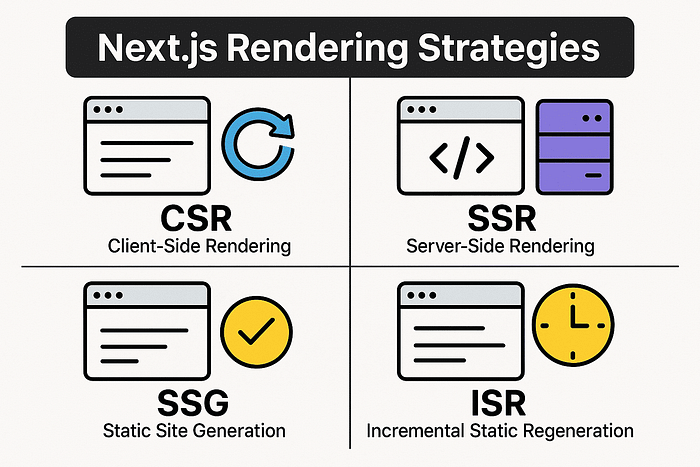
Hello everyone 👋, we will discuss rendering methods in Next.js, analyzing how they work and what are their pros and cons. This is an important topic because knowing these options well allows us to choose the right strategy to optimize performance and improve the user experience. By the end of the article, you will know which rendering method is best suited for your project and how to make the most of it!
Introduction
Next.js provides various strategies to render a page: “SSR(Server Side Rendering), CSR(Client Side Rendering), SSG(Static site generation), and ISR(Incremental Static Regeneration).”
Client Side Rendering
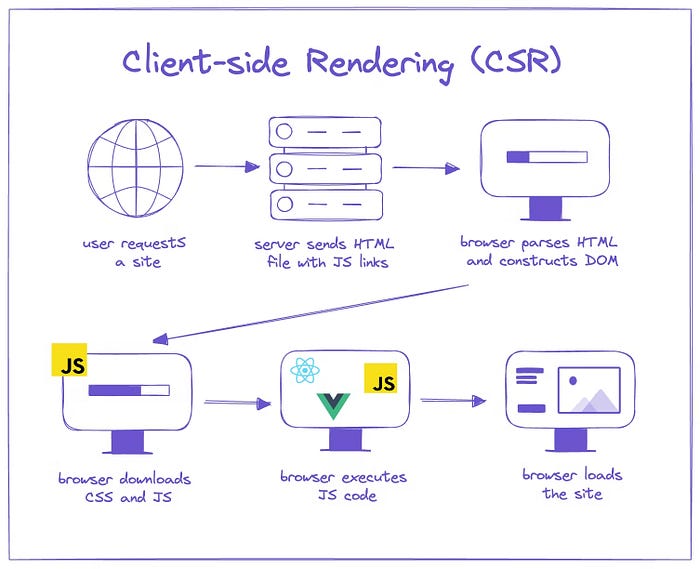
Client-side rendering (CSR) is a methodology in which the browser takes care of loading and rendering the user interface of a web app using JavaScript. This process takes place in several steps:
- Request and Response Flow: The client sends a request to the server via a URL, and the server responds with “empty” HTML containing the scripts necessary to download our site’s resources(taking time in the meantime, we are shown a blank page).
- Resource Loading: JavaScript scripts download the necessary CSS and files, which are then executed to generate and make the page interface interactive.
- Data Fetching: Having reached this point, we have downloaded the necessary resources, but if our page is populated with data, then another request will be made.
OSS: The “empty” page served to us will load the different resources of the routes we will navigate. This methodology is defined as SPA(Single Page Application).
<!-- Empty File --!>

<html lang="en">
  <head>
    <!-- Maybe some stuff here -->
  </head>
  <body>
    <div id="root"></div>
    <script
      src="/static/bundle.js"
    ></script>
    <script
      src="/static/0.chunk.js"
    ></script>
    <script
      src="/static/main.chunk.js"
    ></script>
  </body>
</html>
What are the benefits of CSR?
- CSR Suitability: The ability to manage the interaction and rendering of our web app directly in the browser makes CSR particularly suitable for highly dynamic applications, such as dashboards or chat apps that do not require optimization on the SEO or “load speed” side.
- Server Workload Reduction: Decrease the workload of the server, which would otherwise have to have enough resources to download style, data, and whatnot.
What are the disadvantages of CSR?
- Slow Initial Load: Slow initial loading when we first request the page, as the browser has to go through the whole process seen above. Under slow connection conditions, this process can lead to a poor user experience (UX), with longer wait times before seeing the page content.
- JavaScript Disabled: A user disables JavaScript. Since the loading of resources is done via JS scripts, if JavaScript is disabled, no resources will be loaded, and we will see a blank page.
- Resource Caching Challenges: The complex management of resource caching. Although some resources can be cache-ed, the process is more complicated than Server-Side Rendering (SSR) because many resources are loaded through JavaScript or APIs, making optimizing caching for improved performance difficult.
- SEO Limitations: Serving an “empty” page will make it difficult for web bots and crawlers to index the page.
Server Side Rendering
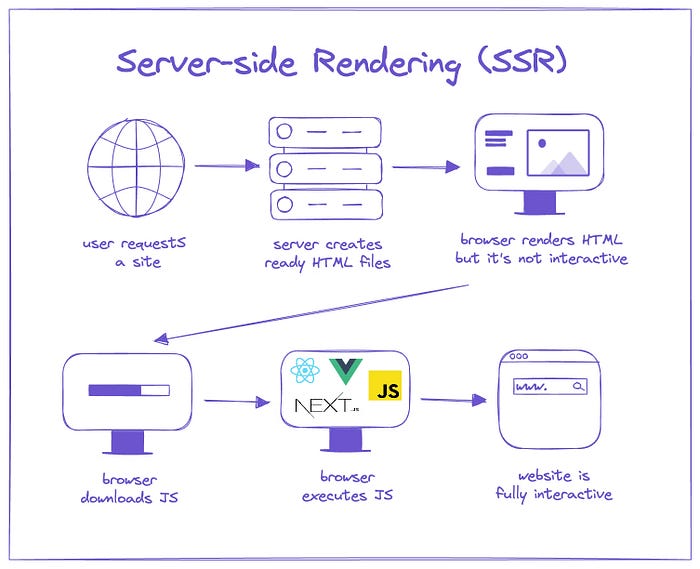
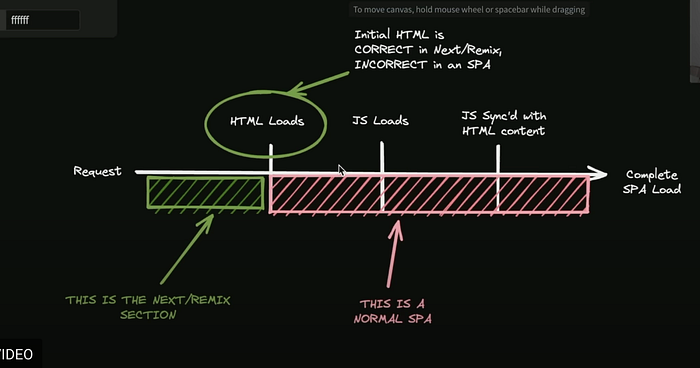
Server-side rendering is the process that generates the server-side HTML page and sends it to the client. The initial page will be static and will later be hydrated to make it interactive. This process is called double rendering.
What are the benefits of SSR?
- JavaScript Disabled Handling: In case the user disables JavaScript, the end user will still see the page on the screen, unlike CSR, where we would have a blank page.
- SSG Build Optimization: In case the page did not require dynamic data, next.js the build time with the method of SSG(Static Site Generation).
- SEO Advantage: Since the HTML page is not empty, it will be easier for bots and crawlers to index the page.
What are the disadvantages of SSR?
- Increased server loadings: We must have a server with all the necessary resources so that we can make our site quickly
- Difficulties in debugging: Compared to client-side debugging, it is more complex, also derived from having to know how SSR works.
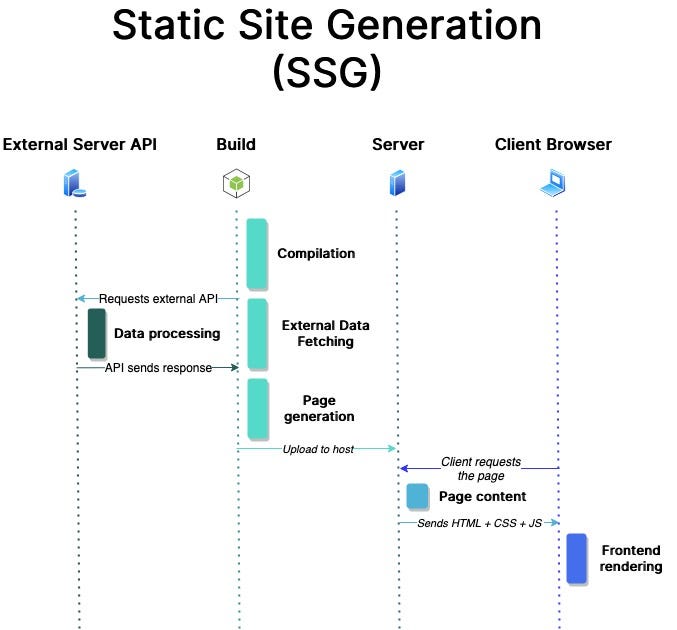
Static Site Generation
The SGG generates pages in build-time and provides the client with static files that are not re-generated with each request. The SSG is a method that uses next by default in case of pages that do not have dynamic data.
What are the benefits of SSG?
- Page loading speed: Since the pages are pre-generated, we have a faster loading speed at the client and SSR.
- Better Security: If more protected in case of server-side attacks, being that SSG does not execute any server-side code.
- Less server-side load: As seen above, the cons of SSR are the resources needed to load our site. Thanks to SSG, we do not face these problems because the server will have less work to do.
What are the disadvantages of SSG?
- Limited support for dynamic content: Being pre-generated files, we will encounter difficulties in using them with pages with dynamic content, requiring perhaps that they must always be updated to the latest value, such as real-time data.
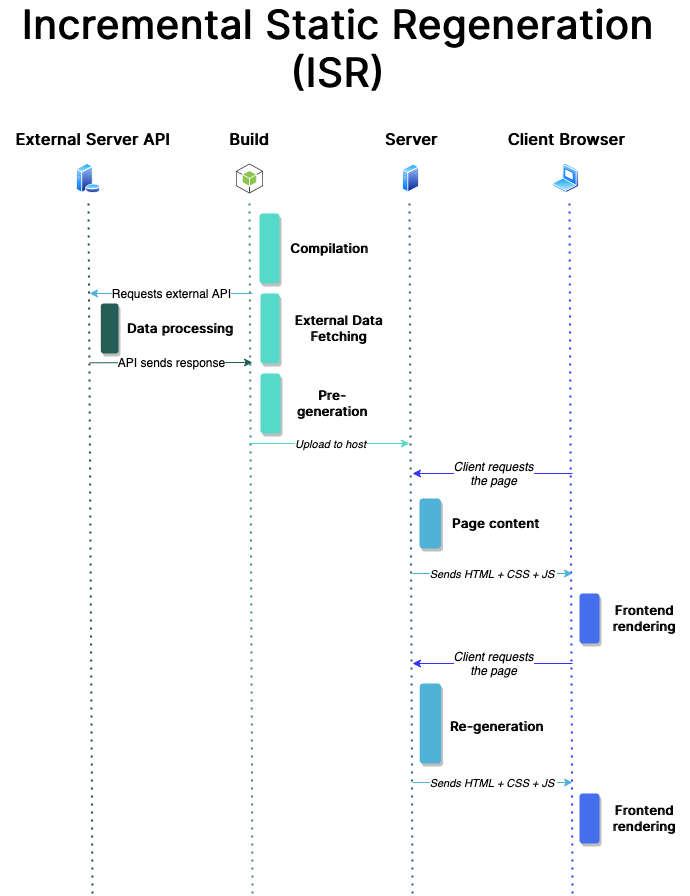
Incremental Site Generation
Static pages have the weakness of not being dynamic but are fast, which is why ISR was invented. ISR combines SSG and SSR. In fact, with ISR, we can decide how often the page should be regenerated.
Get MD’s stories in your inbox
Join Medium for free to get updates from this writer.
To decide the time interval when the page should be requested, we have to insert revalidate in our fetch call with the time expressed in seconds.
What are the benefits of ISR?
- All the benefits of SSG
- Dynamic Updates: Pages can be updated automatically without requiring a new build of the entire site. This is useful for content that changes frequently, such as blogs, product pages, or dashboards.
What are the disadvantages of ISR?
- Temporary Inconsistency: Between updates, users may view outdated versions of the page. Even if the content is regenerated in the background, there may be a delay between the actual update and the display of the latest version.
Conclusion
In conclusion, understanding the different rendering methods available in Next.js is crucial for optimizing the performance and user experience of your web applications. Each method — CSR, SSR, SSG, and ISR — has its unique advantages and limitations, making them suitable for different scenarios.
By choosing the right strategy based on your project’s requirements, you can ensure faster load times, better SEO performance, and a seamless user experience. As you continue your journey with Next.js, keep experimenting with these techniques to find the best fit for your application’s needs!
If you enjoyed this article, I suggest you read the previous article.