Day 02: System Design
By Admin · 1/25/2026
Chapter 2: Core Building Blocks of System Design
1 Client–Server Communication (FOUNDATION)
2 Data Storage Basics (VERY IMPORTANT)
3 Caching Fundamentals
4 Stateless vs Stateful Systems
5 Authentication vs Authorization (HIGH PRIORITY)
6 Load & Scalability Basics
7 Failure Awareness (Beginner Level)
Client–Server Communication (FOUNDATION)
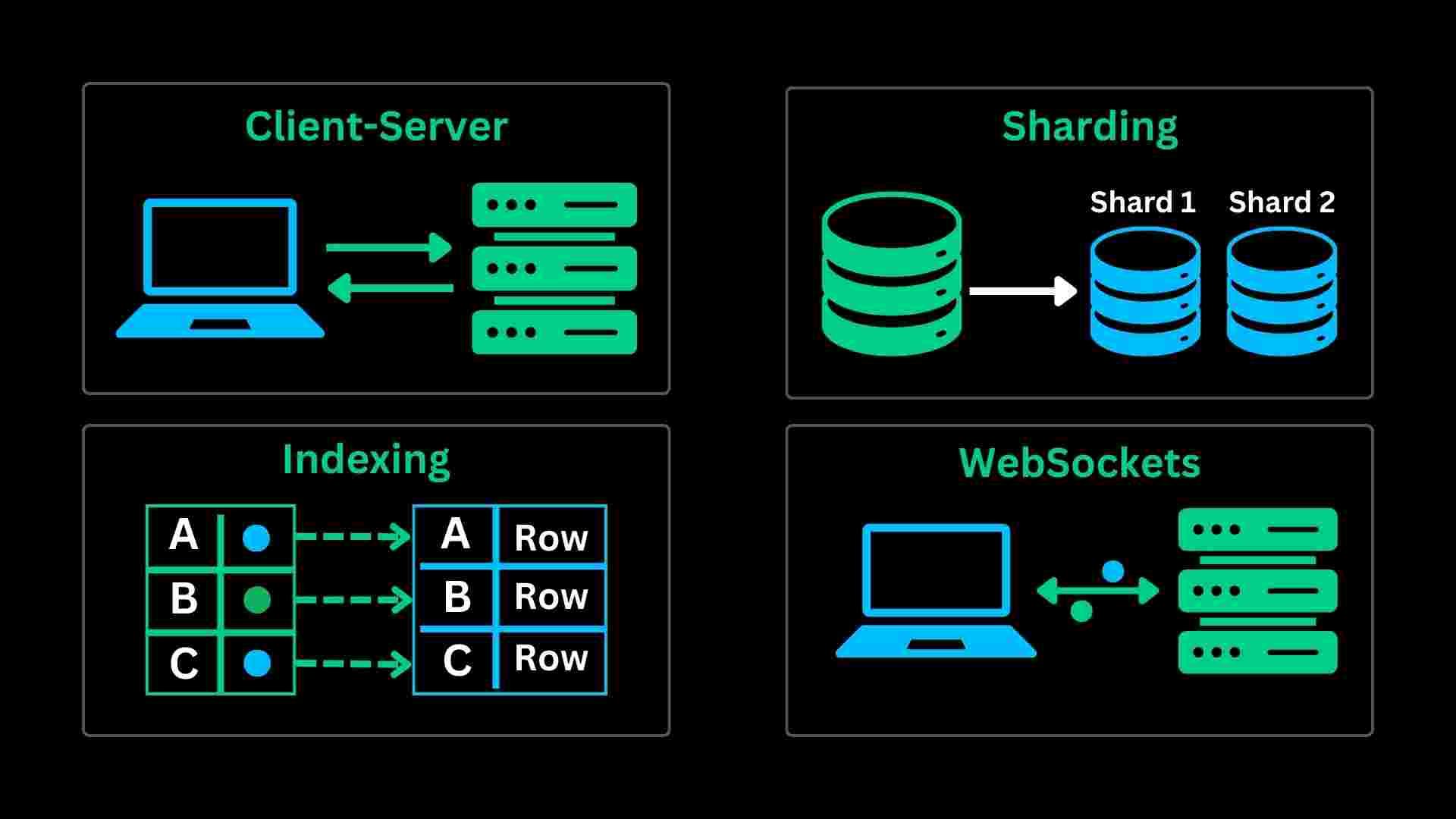
Client Server Communication refers to the exchange of data and Services among multiple machines or processes. In Client client-server communication System one process or machine acts as a client requesting a service or data, and Another machine or process acts like a server for providing those Services or Data to the client machine
Different Ways of Client-Server Communication
In Client Server Communication we can use different ways.
Sockets Mechanism
Remote Procedure Call
Message Passing
Inter-process Communication
Distributed File Systems
Sockets Mechanism
Sockets do machines ke beech communication ke endpoints hote hain, jinke through client aur server directly data exchange kar sakte hain.

Ye same machine ya internet par bhi kaam karte hain aur bidirectional (two-way) communication allow karte hain.
Remote Procedure Call
RPC ek protocol hota hai jo client ko remote server par function ko aise call karne deta hai jaise wo local function ho.
Isme client ka call network message me convert hota hai, server execute karta hai aur result wapas client ko bhej deta hai.

Distributed File Systems
Distributed File Systems provide access to files from multiple machines in network. Client can access and manipulate files stored on Remote Server, Through Standard Interface Example Network File System and Server Message Block.

Data Storage Basics (VERY IMPORTANT)
In system design, data storage decisions decide scalability, performance, and reliability.
A weak storage choice can break even the best architecture.
Why Data Storage Matters So Much
Every system, whether it’s a simple login service or a large-scale social media platform, revolves around data. Users sign up, messages are sent, payments are processed, and logs are generated — all of this must be stored somewhere.
A poor storage choice leads to slow responses, frequent downtime, and painful migrations later. On the other hand, a well-designed storage layer allows your system to grow smoothly as users increase.
In system design interviews, many performance bottlenecks eventually point back to the database. That’s why interviewers pay close attention to how you think about data storage.
Types of Databases (High-Level)
SQL or relational database
NoSql or non-relational database
Read-Heavy vs Write-Heavy Systems
Another critical aspect of data storage design is understanding how data is accessed.
Some systems are read-heavy, where users mostly fetch existing data. News websites and product catalogs fall into this category. These systems benefit greatly from caching, read replicas, and indexing.
Other systems are write-heavy, where data is continuously generated. Chat applications, logging systems, and event tracking platforms need storage solutions optimized for high write throughput. Here, techniques like sharding and asynchronous writes become important.
Ignoring access patterns often leads to poor performance even with the “right” database.
Indexing: The Hidden Performance Booster
Indexing is one of the most powerful yet misunderstood concepts in databases. An index acts like a shortcut, allowing the database to locate data quickly without scanning the entire table.
Indexes significantly improve read performance, but they come at a cost. Writes become slightly slower, and storage usage increases. In system design, indexing must be applied thoughtfully, focusing on frequently queried fields rather than indexing everything blindly.
Scaling Data Storage: Replication and Sharding more
As systems grow, a single database is rarely enough.
Replication involves creating multiple copies of the same data. This improves availability and allows read operations to be distributed across replicas.

Sharding, on the other hand, splits data across multiple databases. Instead of copying the same data, each database stores a subset. This approach helps systems handle massive datasets and high write traffic but adds complexity to queries and maintenance.
Choosing between replication and sharding — or combining both — is a common system design challenge.
Consistency and Trade-offs more
In distributed data storage, consistency becomes a design decision rather than a default guarantee. Strong consistency ensures every user sees the same data immediately, but it can increase latency. Eventual consistency allows faster responses but may temporarily show stale data.

A good system designer knows where accuracy is critical and where it can be relaxed. This balance directly affects user experience and system scalability.
Caching Fundamentals
When systems become slow, the problem is often not the server or the code — it’s the database.
Caching exists to solve exactly this problem.

In system design, caching is one of the most powerful and cost-effective performance optimizations. This article takes you from basic intuition to advanced caching strategies, the way a system designer thinks.
What is Caching (Intuition First)
Caching means storing frequently used data closer to where it is needed, so the system does not have to recompute or re-fetch it every time.
Instead of:
Client → Server → Database → Server → Client
With caching:
Client → Server → Cache → Server → Client
The result is faster response time, lower load, and better scalability.
Where Can Caching Be Applied (Beginner Level)
1. Client-Side Cache
Browsers cache:
Images
CSS
JavaScript files
This avoids repeated network calls and improves page load speed.
2. Server-Side Cache
Backend services cache:
User profiles
Product details
Configuration data
This is where tools like Redis or Memcached are commonly used.
3. Database-Level Cache
Databases internally cache:
Query results
Index pages
Frequently accessed rows
This happens automatically but still has limits.
4. CDN Cache
Content Delivery Networks cache:
Images
Videos
Static files
This reduces latency for users across the globe.
Cache Hit and Cache Miss (Core Concept)
Every cache lookup results in one of two outcomes:
Cache Hit → data found in cache → fast response
Cache Miss → data not found → fetch from DB → store in cache
Good caching design focuses on maximizing cache hit ratio.
Final Takeaway
Caching is one of the highest-impact concepts in system design.
It improves performance, scalability, and user experience — but only when used thoughtfully.
“Caching turns slow systems into fast ones, but careless caching turns correct systems into buggy ones.”
Stateless vs Stateful Systems
One of the most important ideas in system design is understanding where state lives.
This single decision affects scalability, fault tolerance, and simplicity of your entire system.

What Do We Mean by “State”?
State is any information a system needs to remember between requests.
Examples:
Logged-in user information
Shopping cart contents
Session data
User preferences

If a server remembers this information, it is stateful.
If it does not, it is stateless.
Stateful Systems (Beginner View)
In a stateful system, the server stores user-specific data in its own memory or local storage.
How It Works
User logs in
Server stores session info in memory
All future requests must go to the same server
Example
Traditional session-based login
Single-server applications
Why Stateful Feels Natural
Stateful systems are easy to understand and simple to build at small scale. Everything related to a user lives in one place.
Problems with Stateful Systems
Stateful systems break down as soon as scale enters the picture.
Key Issues
Hard to scale horizontally
New servers don’t have existing session data.Sticky sessions required
Load balancer must route the same user to the same server.Poor fault tolerance
If a server crashes, user sessions are lost.
Because of these problems, large-scale systems try to avoid stateful servers.
Stateless Systems (Beginner View)
In a stateless system, the server does not remember anything about previous requests.

Every request contains all the information needed to process it.
How It Works
Client sends request + token
Server validates token
Server responds and forgets everything
Example
JWT-based authentication
REST APIs
Microservices
Stateless servers treat every request as new and independent.
Why Stateless Systems Scale Better
Stateless design unlocks the most important system design advantages:
Horizontal Scaling
Any request can go to any server.
Adding new servers becomes easy.
Fault Tolerance
If one server fails, another can immediately handle traffic without data loss.
Simpler Load Balancing
No sticky sessions needed. Load balancer distributes traffic freely.
That’s why stateless systems dominate modern cloud architectures.
Where Does the State Go Then?
If servers are stateless, state still exists, just not on the server.
Common locations:
Client (cookies, tokens)
Database
Distributed cache (Redis)
The key idea is:
“State is externalized.”
This makes servers replaceable and scalable.
Authentication Example: Stateful vs Stateless

Stateful Authentication
Server stores session in memory
Session ID sent in cookie
Requires sticky sessions
Stateless Authentication
Server issues JWT
Client sends JWT with every request
Server validates token without storing session
Most modern systems prefer stateless authentication.
Interview Perspective
Strong Interview Statement:
“Stateless systems scale better and are fault-tolerant, while stateful systems are simpler but harder to scale horizontally.”
MOST COMMONLY ASKED system types
1 Centralized System
2 Client–Server System
3 Distributed System ⭐ (VERY IMPORTANT)
4 Monolithic System
5 Microservices System
6 Distributed Monolith (Common Interview Trap)
7 Peer-to-Peer (P2P) System
8 Event-Driven System
9 Real-Time System